# See the elements of a function by running the name of
# the function without parentheses in the console
example.function<srcref: file "" chars 2:21 to 9:1>
r fundamentals, packages, programming
2026-01-27
<-
class_name <- "D2M-R"Class_Name, class_name, and CLASS_NAME are different variablesstudent1, .temp_value are valid; 1student, _value are nottotal.score, data_frame_1 are valid; total-score, data frame are notstudent_age, is_enrolled, total_scorecamelCase, snake_case, or dot.notationData you can work with in R takes one of 61 forms, most commonly:
| Data type | Description | Example |
|---|---|---|
| Numeric | Decimal numbers, including whole numbers | 3.14, 42.0, -1.5 |
| Integer | Whole numbers (exclusively), represented with an L suffix |
42L, -1L, 1000L |
| Logical | Boolean values, either TRUE or FALSE |
TRUE, FALSE or T, F |
| Character | Text strings, enclosed in quotes | "hello", '123', "R is great!" |
There are also a few “honorary” data types:
| Data type | Description | Example |
|---|---|---|
| Factor | Leveled categorical data, stored as integers with labels | factor(c("low", "medium", "high")) |
| Date | Dates, stored as a special class of object | as.Date("2025-01-31") |
| POSIXct | Date-time objects, which include both date and time | as.POSIXct("1776-07-04 12:01:59") |
| empty | Not a data type, but the absence of data | NA |
R organizes data into structures to for manipulation and analysis. The main data structures are:
| Data structure | Description | Example |
|---|---|---|
| Scalar | Single data value of any data type | 42, "hello", TRUE |
| Vector | One-dimensional array of elements of the same data type | c(1, 2, 3, 4, 5) |
| List | Ordered collection of elements that can be of different data types | list(name = "Alice", age = 30, scores = c(90, 85, 88)) |
| Matrix | Two-dimensional array of elements of the same data type | matrix(1:6, nrow = 2, ncol = 3) |
| Data Frame | Two-dimensional, tabular data structure with columns of potentially different data types | data.frame(name = c("Alice", "Bob"), age = c(30, 25)) |
| Tibbles | Alternative data frames with enhanced features | tibble::tibble(name = c("Alice", "Bob"), age = c(30, 25)) |
<3 of ROperators are symbols that perform operations on variables and values. The main types of operators in R are:
| Operator type | Description | Example |
|---|---|---|
| Arithmetic | Perform mathematical calculations | +, -, *, /, ^ |
| Relational | Compare values and return logical results | ==, !=, <, >, <=, >= |
| Logical | Combine or negate logical values | &, |, ! |
| Assignment | Assign values to variables | <-, =, -> |
Arithmetic do math.
| Operator | Description | Example | Output |
|---|---|---|---|
+ |
Addition | 3 + 5 |
8 |
- |
Subtraction | 10 - 4 |
|
* |
Multiplication | 6 * 7 |
42 |
/ |
Division | 20 / 4 |
5 |
^ |
Exponentiation (power) | 2 ^ 3 |
8 |
%% |
Modulo (remainder of division) | 10 %% 3 |
1 |
Relational or comparison operators compare objects and return a logical value (TRUE or FALSE). They are a special kind of logical operator.
| Operator | Description | Example | Output |
|---|---|---|---|
== |
Equal to | 5 == 5 |
TRUE |
!= |
Not equal to (“≠”) | 5 != 3 |
TRUE |
> |
Greater than | 7 > 4 |
TRUE |
< |
Less than | 3 < 8 |
TRUE |
>= |
Greater than or equal to | 6 >= 6 |
TRUE |
<= |
Less than or equal to | 2 <= 5 |
TRUE |
Warning: '==' != '='
The == operator checks for equality, while = is an (argument) assignment operator.
Logical operators combine and modify boolean values (TRUE or FALSE).
| Operator | Description | Example | Output |
|---|---|---|---|
& |
“and”: both sides of the operators evaluate to TRUE |
TRUE & FALSE |
FALSE |
| |
“or”: at least one side of the operator evaluates to TRUE |
TRUE | FALSE |
TRUE |
! |
“not”: the opposite of something’s logical evaluation | !TRUE |
FALSE |
| Operator | Description | Example | Output |
|---|---|---|---|
<- |
Variable assignment operator | x <- 5 |
Assigns the value 5 to the variable x |
= |
Argument assignment operator | round(3.14159, digits = 2) |
Assigns the value 2 to the digits argument of the round() function |
: |
Create a sequence of integers | 1:5 |
c(1, 2, 3, 4, 5) |
[ ] |
Subset elements of a vector, list, or data frame by position or name | list(first = 1, second = 2)[2] |
> $second > [1] 2 |
[[ ]] |
Extract a single element from a list by position or name | list(first = 1, second = 2)[[2]] |
2 |
$ |
Extract a single element from a list or data frame by name | list(first = 1, second = 2)$second |
2 |
|> or %>% |
Pipe operator to pass the output of one function as the input to another | data |> filter(condition) |
Passes data as the first argument to filter() |
function_name(argument1, argument2, ...)
paste("Hello", class_name)= operator or by position following default order
round(3.14159) is the same as round(x = 3.14159)round(2, 3.14159) is not the same as round(digits = 2, x = 3.14159).?functionname or ??functionname.All functions have:
Use the function() function to define your own functions:
Names
Arguments
function_name(value1, value2)function_name(arg2 = value2, arg1 = value1)Procedure Body
Return Value
return(), that value is printed to console
return(arg1 + arg2) returns sum of arg1 and arg2return() is used, the last evaluated expression is returned by default
arg1 + arg2 returns sum of arg1 and arg2result <- arg1 + arg2 does not return anything| Function | Description | Example | Output |
|---|---|---|---|
c() |
Combine values into a vector | c(1, 2, 3) |
c(1, 2, 3) |
paste() |
Concatenate strings together | paste("Hello", "world!") |
|
data.frame() |
Create a data frame from vectors | data.frame(x = 1:3, y = c("a", "b", "c")) |
A data frame with 3 rows and 2 columns named x and y |
class() |
Check the data type of an object | class(3.14) |
"numeric" |
str() |
Display the structure of an object | str(mtcars) |
A summary of the mtcars data frame |
length() |
Get the length of a vector | length(c(1, 2, 3, 4, 5)) |
5 |
head() |
View the first few rows of a data frame or vector | head(mtcars) |
The first 6 (default) rows of the mtcars data frame |
summary() |
Get a summary of a data frame or vector | summary(mtcars) |
Summary statistics for each column in the mtcars data frame |
| Function | Description | Example | Output |
|---|---|---|---|
round() |
Round a numeric value to a specified number of decimal places | round(67.1988, 2) |
67.2 |
sum() |
Calculate the sum of a numeric vector | sum(number_list) |
3415 |
min() |
Find the minimum value in a numeric vector | min(number_list) |
-3 |
max() |
Find the maximum value in a numeric vector | max(number_list) |
2025 |
| Function | Description | Example | Output |
|---|---|---|---|
mean() |
Calculate the mean of a numeric vector | mean(number_list) |
426.875 |
median() |
Calculate the median of a numeric vector | median(number_list) |
71.5 |
sd() |
Calculate the standard deviation of a numeric vector | sd(number_list) |
726.7456693 |
cor() |
Calculate the correlation between two numeric vectors | cor(number_list[1:4], number_list[5:8]) |
-0.2855236 |
Consider two very useful functions:
Someone out there really needs to add two to things in multiple ways. Tragically, base R just doesn’t have the essential tools needed for all the two-adding tasks. This two-adding user would benefit from accessing both these functions together for:
run_chatter_pipeline <- function(
tbl, tbltype, target.ptcp, addressee.tags, cliptier, nearonly,
lxonly = default.lxonly,
allowed.gap = default.max.gap, allowed.overlap = default.max.overlap,
min.utt.dur = default.min.utt.dur, interactants = default.interactants,
mode = default.mode, output = default.output, n.runs = default.n.runs) {
# step 1. read in the file
spchtbl <- read_spchtbl(filepath = tbl, tbltype = tbltype,
cliptier = cliptier,
lxonly = lxonly, nearonly = nearonly)
# step 2. run the speech annotations through the tt behavior detection pipeline
ttinfotbls <- fetch_chattr_tttbl(
spchtbl = spchtbl, target.ptcp = target.ptcp,
cliptier = cliptier, lxonly = lxonly,
allowed.gap = allowed.gap, allowed.overlap = allowed.overlap,
min.utt.dur = min.utt.dur, interactants = interactants,
addressee.tags = addressee.tags,
mode = mode, output = output, n.runs = n.runs)
# step 3. create a summary of the tt behavior by clip and overall,
# incl. the random baseline
ttinfotbls$tt.summary <- summarize_chattr(ttinfotbls)
return(ttinfotbls)
}To use functions from a package, you must first:
install.packages("packagename")library(packagename) or require(packagename)Loading vs attaching
Calling library() on a package makes its functions available for use as though they were built into R itself. We usually call this loading the package, but technically it’s attaching it.
Once a package is installed on your machine, you can load functions directly without attaching the whole package with library(). Do so by prefixing the function with the name of the package and two colors: packagename::functionname().
Functions in packages are often defined using functions from other packages. The former package depends on the latter, its dependency.
A package’s CRAN documentation will list its dependencies in three categories:
In practice…
When you install or load a package, R will automatically install or load its Depends and Imports dependencies for you. Usually this will just happen without you needing to even notice, but occasionally you may be prompted by the console to approve the installation/loading of dependencies. Rarely, you may need to manually install or load a dependency.
| Package Name | Description |
|---|---|
tidyverse |
Ecosystem of packages for data manipulation, visualization, and analysis; includes core tidyverse packages1 |
bibtex |
BibTeX tools for R (bibliography management) |
citr |
RStudio add-in to insert citations |
DescTools |
Tools for descriptive statistics |
gt |
Easily create presentation-ready tables |
knitr |
Dynamic report generation in R |
lme4 |
Linear and generalized linear mixed-effects models |
psych |
Procedures for psychological, psychometric, and personality research |
quarto |
Tools for working with the Quarto markdown publishing system |
rmarkdown |
Authoring dynamic documents with R Markdown |
usethis |
Automate package and project setup tasks |
| Package Name | Description |
|---|---|
broom |
Convert statistical analysis objects into tidy tibbles |
data.table |
Fast data manipulation and aggregation |
flextable |
Functions for reporting tabular results in R Markdown and Word |
haven |
Import and export of SPSS, Stata, and SAS files |
janitor |
Simple tools for examining and cleaning dirty data |
kableExtra |
Construct complex tables in R Markdown |
papaja |
APA style manuscript preparation with R Markdown |
pwr |
Power analysis for general linear models |
RColorBrewer |
Color palettes for maps and figures |
patchwork |
Combine separate ggplot2 plots into the same graphic |
vcd |
Visualizing categorical data |
ggsci |
Scientific journal and sci-fi movie color palettes for ggplot2 |
Indexing and subsetting are ways to select specific elements from data structures like vectors, lists, data frames, and matrices.
Indexing: Identifying the position of an element within a data structure (or positions within sub-structures) using numeric position or name.
Subsetting: Extracting a portion of a data structure based on specific criteria (e.g., selecting certain rows or columns from a data frame), including indexing.
Create a vector of integers beginning with one number and ending with another using ::
[1] 3 4 5 6 7
[1] TRUE TRUE TRUE TRUE TRUE
Select elements of a vector by position or name with [ ]:
3
fourth
1000
Select elements of a list by position or name with [ ] and [[ ]]:
$second
[1] 2
[1] 2
[1] 2
Select elements of a data frame or matrix by position or name with [ ] and [[ ]], using , to separate row and column indices:
mpg cyl disp hp drat wt qsec vs am gear carb
Mazda RX4 21 6 160 110 3.9 2.62 16.46 0 1 4 4
[1] 21.0 21.0 22.8 21.4 18.7 18.1 14.3 24.4 22.8 19.2 17.8 16.4 17.3 15.2 10.4
[16] 10.4 14.7 32.4 30.4 33.9 21.5 15.5 15.2 13.3 19.2 27.3 26.0 30.4 15.8 19.7
[31] 15.0 21.4
[1] 21
Select a list or data frame element by name with $:
[1] 2
[1] 21.0 21.0 22.8 21.4 18.7 18.1 14.3 24.4 22.8 19.2 17.8 16.4 17.3 15.2 10.4
[16] 10.4 14.7 32.4 30.4 33.9 21.5 15.5 15.2 13.3 19.2 27.3 26.0 30.4 15.8 19.7
[31] 15.0 21.4
Environments: data structures that store variable bindings (associations between variable names and their values) in R.
Scope
Environments are scoped, meaning that variables defined within an environment are only accessible within that environment and its child environments.
Global environment variables are accessible from its local environment children, but local environment variables are not accessible from the parent global environment.
Control flow: the order in which individual statements, instructions, or function calls are executed or evaluated within a program.
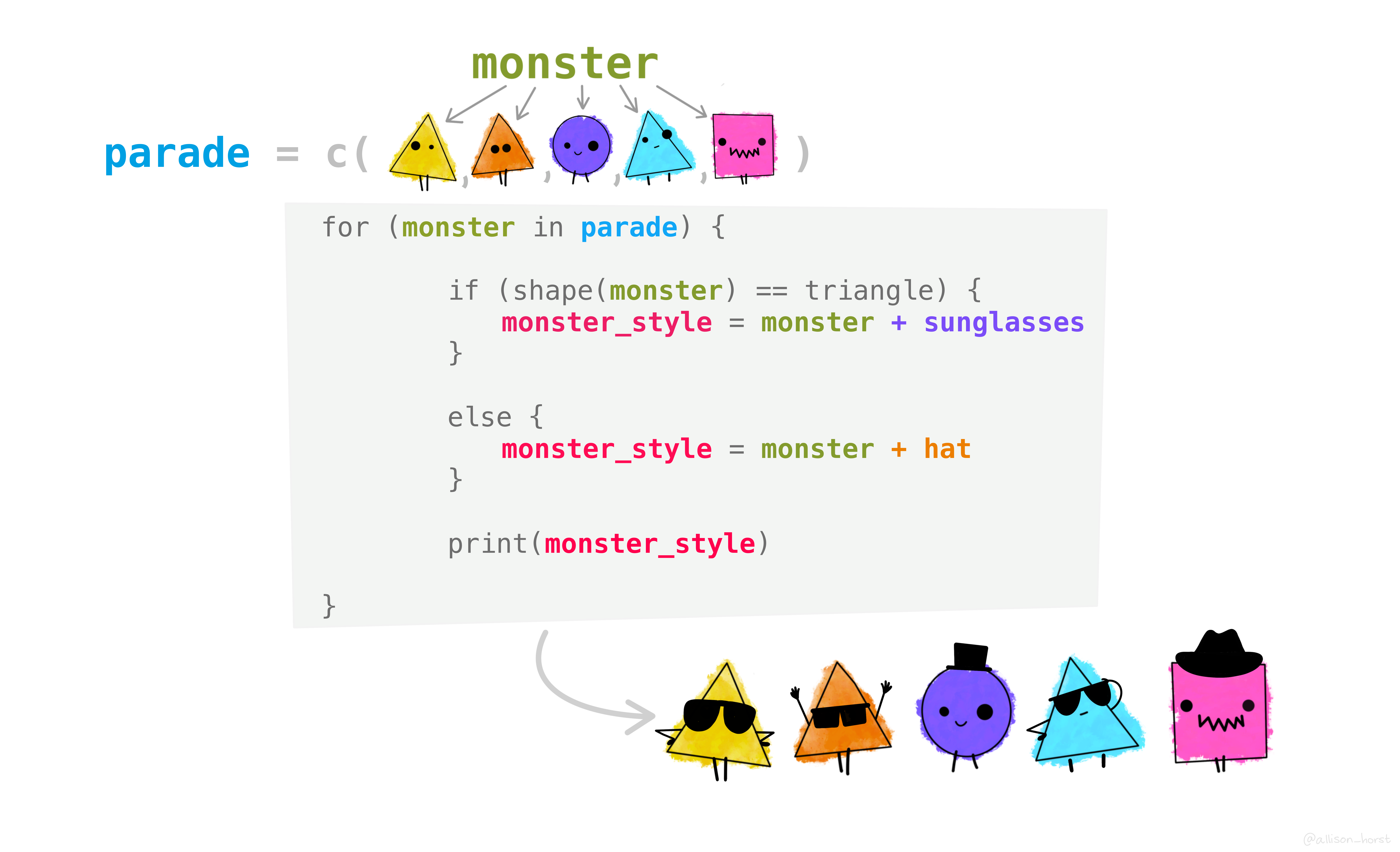
In R, control flow is managed using conditional statements and loops.
Conditional statements allow you to execute different blocks of code based on whether certain conditions are met.
| Statement | Description |
|---|---|
if |
Execute a block of code if a specified condition is TRUE |
if...else |
Execute one block of code if a condition is TRUE, |
if...else if...else |
Execute different blocks of code based on multiple conditions |
# Example of if...else if...else statement
z <- 0 # change this value to test different outcomes
# Check if z is a number
# if it is, do the checks inside the {}
# if it isn't, go to the else statement
if (is.numeric(z)) {
if (z > 0) { # is it positive?
print("z is positive") # if it is, say so and then STOP
# if not, is it negative?
} else if (z < 0) { # if not, is it negative?
# if it is, say so and then STOP
print("z is negative") # if it is, say so and then STOP
# if not positive and not negative, it must be zero
} else {
print("z is zero") # say so and then STOP
}
# if it isn't a number, say so and then STOP
} else {
print("z is not a number")
}[1] "z is zero"
R’s conditional functions provide a way to perform conditional operations in a more functional, condensed style.
| Function | Package |
|---|---|
ifelse() |
base |
if_else() |
dplyr |
case_when() |
dplyr |
The examples from the previous slide can be written more concisely:
Iteration, or looping, allows you to repeat a block of code multiple times, either a fixed number of times or while a certain condition is met.
| Loop Type | Description |
|---|---|
for |
Repeats a block of code for each item in a sequence or vector |
while |
Repeats a block of code as long as a specified condition is TRUE |
![]()
When I say go
![]()
Do this thing
![]()
And keep doing it
![]()
Until I say stop
for LoopsWhen I say go
i = my_list[1]
Do this thing
print(i)
And keep doing it
i = my_list[2]
i = my_list[3]...
Until I say stop
my_list[6] > length(my_list)
while LoopsWhen I say go
i = 1
Do this thing
print(i)
i <- i + 1
And keep doing it
print(i + 1)
print(i + 2)...
Until I say stop
i >= 6
for vs whilefor
while
TRUEUse while for potentially but not actually infinite sequences. Your code must eventually lead to a FALSE evaluation:
i <- i+1while condition will eventually be FALSE when iterated using that mechanism
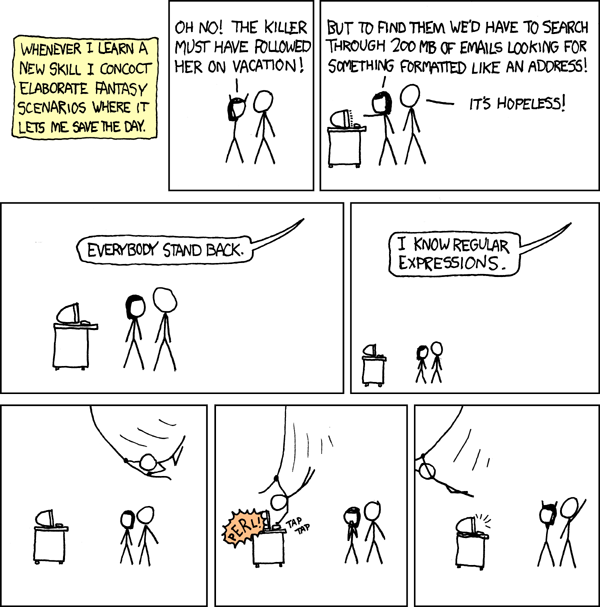
i < 6Regular expressions (regex or regexp): sequences of characters that form a search pattern, primarily used for string matching and manipulation.
Examples of regex syntax:
^Hello: matches any string that starts with “Hello”[aeiou]: matches any single vowel character (a, e, i, o, u)\d{3}-\d{2}-\d{4}: matches a pattern like a US Social Security number (e.g., “123-45-6789”)
\\d{3}-\\d{2}-\\d{4}| Symbol | Description | Example |
|---|---|---|
. |
Matches any single character except newline | a.b matches “acb”, “a1b”, “a b” |
^ |
Matches the start of a string | ^Hello matches “Hello world” |
$ |
Matches the end of a string | world$ matches “Hello world” |
* |
Matches 0 or more occurrences of the preceding element | ab* matches “a”, “ab”, “abb”, “abbb” |
+ |
Matches 1 or more occurrences of the preceding element | ab+ matches “ab”, “abb”, “abbb” but not “a” |
? |
Matches 0 or 1 occurrence of the preceding element | ab? matches “a” and “ab” |
[] |
Matches any one character within the brackets | [aeiou] matches “a”, “e”, “i”, “o”, or “u” |
| |
Logical OR operator | cat|dog matches “cat” or “dog” |
() |
Groups expressions | (ab)+ matches “ab”, “abab”, “ababab” |
| Symbol | Description | Example |
|---|---|---|
\d |
Matches any digit (0-9) | \d matches “0”, “1”, …, “9” |
\w |
Matches any word character (alphanumeric + underscore) | \w matches “a”, “b”, …, “z”, “A”, “B”, …, “Z”, “0”, “1”, …, “9”, “_” |
\s |
Matches any whitespace character (space, tab, newline) | \s matches ” “,”, “” |
{n} |
Matches exactly n occurrences of the preceding element | a{3} matches “aaa” |
{n,} |
Matches n or more occurrences of the preceding element | a{2,} matches “aa”, “aaa”, “aaaa”, … |
{n,m} |
Matches between n and m occurrences of the preceding element | a{2,4} matches “aa”, “aaa”, or “aaaa” |
Characters that have assigned functions will perform that function unless they are escaped.
Escape a special character to refer to its literal meaning.
\) as the escape character.\) as the escape character.\\) to escape special characters because the backslash itself is an escape character in R strings.TELL ME WHY.
base)Base R uses “grep” functions for regex operations.
function_name(pattern_to_find, string_to_search, other_args)Common grep functions:
grep(): Search for patterns in strings and return indices of matchesgrepl(): Search for patterns and return logical vector indicating matchesgsub(): Replace occurrences of a pattern with a specified replacementbase): Examples[1] "The rXXX in SpXXX stays mXXXly in the plXXX."
stringr)The stringr package (part of the tidyverse) provides an alternative set of string manipulation functions, using consistent syntax and behavior across nearly all stringr functions
str_ + descriptive function namestr_func(string_to_search, pattern_to_find, other_args)
Common stringr functions:
str_which(): Search for patterns in strings and return indices of matchesstr_detect(): Search for patterns and return logical vector indicating matchesstr_replace_all(): Replace occurrences of a pattern with a specified replacementstringr): Examples[1] "The rXXX in SpXXX stays mXXXly in the plXXX."
#, ignored by Rif, if...else)ifelse(), case_when())for loops: iterate over a known, finite sequencewhile loops: iterate while a condition is TRUE., ^, $, *, +, ?, [], |, ()\), using double backslashes (\\) in R stringsgrep-style functions or stringr str_-style functionsD2M-R I | Week 3
Comments
#symbol